Chat GBT
Getting Started / Logging In
- Sign up → Create an account - i.e. use your email address to sign up or if you use have a Google account, Microsoft Account or Apple account it is typically easier to use this - as you are likely already signed in and don't need to remember a separate password.
- Once Signed in
- select account → Setting
- Data Controls - and disable 'Improve Model for everyone'.
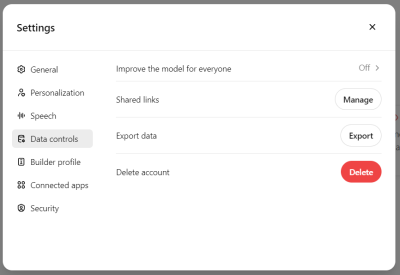
- If this setting is left at the default (enabled), your conversations may be reviewed or analyzed (in anonymized or aggregated form) to help developers identify trends, correct errors, enhance the model's language understanding. However setting this to disabled - means that any documents you upload and your conversations are not included in the model's future sources. Hence I recommend it to be disabled.


Create New Chats for each new topic
- the chats are persistent - and you can ask follow up questions, so create new chats for new topics.
- within a chat - you can upload documents and ask questions on just the uploaded documents.
- You can delete old chats or rename them, which is useful if you want to return to a chat in future, e.g. ask follow questions or you have uploaded certain documents as a source and you want to chatGbt against these sources only.