This is an old revision of the document!
Cisco Meeting Server - CMS
CMS CDRs are in JSON format. We want them in CSV format to import into SQL Server.
Import CMS CDRs into SQL
Verify JSON format of CDR file and correct if necessary
- Gather your CDRs into one folder and pipe to a single file e.g. type * > ../CDR-file.json
- The File can have some corruption on it. Check it is valid JSON using JQ - https://stedolan.github.io/jq/download/
C:\X-Temp>jq-win64 -c . CDRs1.json > CDR12.json
parse error: Expected value before ',' at line 85959, column 471
I found multiple lines with the invalid CDR ending with a double db_record_type. A simple find and replace of
"db_record_type": "cdr_acano"}, "db_record_type": "cdr_acano"}"
with
"db_record_type": "cdr_acano"}
fixes this issue.
Confirm all good by re-running with JQ.
JSON2CSV
- Install latest version of Node
- Install Json2Csv Package - https://www.npmjs.com/package/json2csv
- Convert the file to CSV using the Node json2csv
json2csv -i CDR12.json -o CDR12.csv
Remove "T" and "Z" from DateTime Field
- Open CSV file in excel.
- Do a Find and Replace in the DateTime Column to get rid of the “T” - Find “T” - Replace with a <space>
- Do a Find and Replace in the DateTime Column to get rid of “Z” - Find “Z” - Replace with <blank>
- Save
Import into SQL
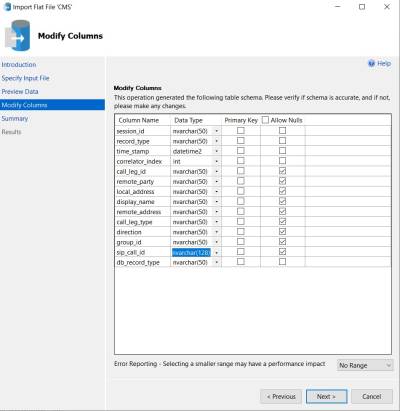
- Import flat file into SQL Server

Run Some SQL Queries
Number of calls per day
SELECT
      DATE = CONVERT(Datetime,(CONVERT(CHAR(10),[time_stamp],102)),102)
      ,TotalCalls = COUNT(*)

  FROM [CMS].[dbo].[CDR_Final]
  WHERE record_type = 'CallLegEnd'

  GROUP BY CONVERT(Datetime,(CONVERT(CHAR(10),[time_stamp],102)),102)
  ORDER BY CONVERT(Datetime,(CONVERT(CHAR(10),[time_stamp],102)),102)